
Better New York-style Compression
By Craig Anderton
Table of Contents
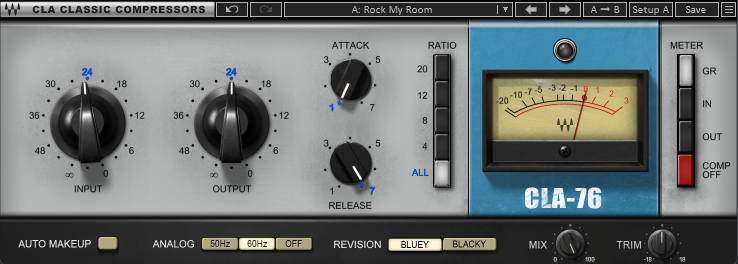
New York-style compression is a processing technique used primarily for drums. In addition to compression for a fat sound, adding dry audio in parallel restores some of the original dynamics. The popularity of this technique has inspired many compressor plug-ins (even emulations of vintage compressors) to include a dry/wet mix control (fig. 1). This allows New York-style compression without having to set up buses or parallel tracks—but that’s just a start. We can take the concept to a higher, better-sounding level.
Why Mixing a Dry Track with a Compressed One Is Not Ideal for New York-Style Compression
Much of the dry signal overlaps with the compressed audio. Although the dry sound mixes the peaks back in, it also overlaps with the compressed signal and partially masks it. The masking detracts from New York-style compression’s goal.
Inserting an Expander in the parallel dry signal isolates the peaks before mixing them with the compressed sound. This avoids masking the compressed drum sound. The result sounds more natural than a transient shaper, and doesn’t obscure the benefits of the compressed audio.
New York-Style Compression Routing in Pro Tools
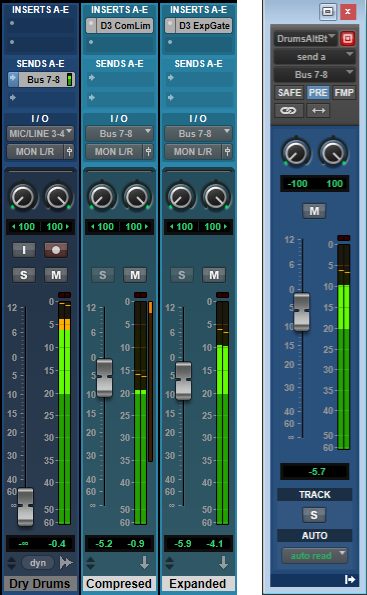
In fig. 2, the Dry Drums go through a pre-fader Send to Buses 7 and 8. One Aux Track has a Compressor inserted. The Aux Track input comes from Buses 7 and 8. Another Aux Track has an Expander inserted. It also receives its input from Buses 7 and 8.
The Dry Drums track is turned down all the way, so the faders for the Compressed and Expanded tracks set the balance of compressed and expanded sounds.
Editing the Compressor and Expander for New York-Style Compression
The compressor’s goal is to create a fat, dense sound (fig. 3). You don’t have to worry about finesse with the attack—the Expanded track takes care of that. So, the attack time is super-fast, which gives more uniform dynamics.
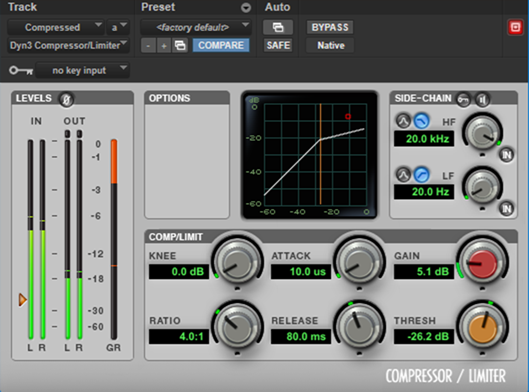
The optimum amount of compression is subjective. The compression parameter values in fig. 3 give a pretty heavy sound without too much blurring. However, note that like any preset involving dynamics, the input level has a huge influence on the sound. Optimize the Compressor and Expander parameters to accommodate the input signal level.
The Expander settings (fig. 4) are the most critical adjustments.
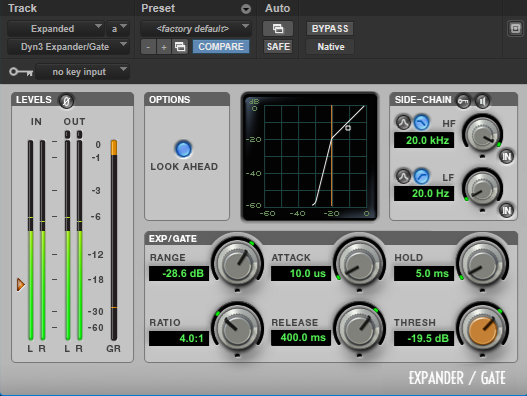
You don’t want the peaks to have so little sustain they sound like they’re being gated, but you do want the threshold high enough to expand the bulk of the drum sound downward. Soloing the Expander channel as you edit makes it easier to find the “sweet spot” where you’re preserving the peaks while reducing everything else. The Ratio and Threshold are arguably the most important parameters.
Higher expansion ratios not only tighten the drums, but leave more space in the arrangement. However, whenever you change any Expander parameter, you’ll probably need to tweak the balance of the Compressed and Expanded track faders. The same goes for adjusting the Attack and Release parameters, which are also important.
But that’s enough theory! A waveform is worth 1,000 words, so here are some audio examples.
1_Dry Drums.mp3: This is the original dry drum loop. We don’t want to lose the gorgeous snare attack.
2_Compressed Drums.mp3: This heavy squashing is typical of New York compression. With standard New York compression, it’s understood that mixing in dry drums will offset the heavy compression somewhat.
3_NYC Compressed.mp3: Mixing in some dry signal with the compressed drums gives the traditional New York compression sound. The peaks have returned. These peaks supplement the compressed signal.
4_Beyond NYC Compressed.mp3: This example adds the Expander in the dry track. The sound is tighter, the snare is punchier, the kick and peaks hit harder, and the sound is cleaner because there’s no heavy overlap of dry and compressed audio at levels below the Expander’s threshold. What’s more, even though the NYC Compressed and Beyond NYC Compressed examples are normalized to the same peak value, the Beyond NYC version is about 0.6 LUFS louder—despite having a more dynamic “feel.”
A Final Random Thought…
Sometimes, it’s worth questioning how we’ve always done something. Replacing a dry path with an Expander resulted from wondering what it would sound like. Who knows how many other techniques are waiting for us to discover them?
Craig Anderton is a music industry legend—from his teenage touring days, to production and mastering projects for artists from classical to hardcore, to his current work in disrupting the publishing industry. Recent e-books include Innovative Techniques for Pro Tools, The Huge Book of Studio One Tips & Tricks, The Big Book of Cubase Tips & Tricks, The Ultimate Guide to Vocal Production, and How to Record and Mix Great Guitar Tracks. Visit his free educational website at craiganderton.org, and hear Craig’s latest music releases on his YouTube channel.