
New features in Studio One 5.1: Part I
Good news!
PreSonus has officially released the new version of its flagship software Studio One 5.1, which you can update for free if you are currently a Studio One owner.
Today we are going to be demonstrating some of the new features included on this update!
Want to learn how to use PreSonus Studio One in real time, with a professional digital audio trainer? It’s faster than blogs, videos, or tutorials. Call OBEDIA for one on one training for Avid Pro Tools and all digital audio hardware and software. Mention this blog to get 15 bonus minutes with your signup! Call 615-933-6775 and dial 1, or visit our website to get started.
Need a Pro Audio laptop or Desktop PC to run PreSonus Studio One software and all of its features at its best?
Check out the Rok Box PSc PreSonus Certified PCs from PCAudioLabs
Table of Contents
Score Printing:
Yes! You asked for it, and they delivered it.
If you are a composer, arranger or orchestra director, you will LOVE this.
Studio One 5.1 now gives you the option to print (or save as PDF) the score coming from your MIDI performances, with a simple click.

Improved Layout, Abbreviations and Track Staff:
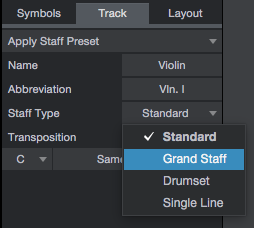
You can now assign an abbreviation to the track’s name in order to make it easier to read on the score view.
Also, the staff type can be changed from 4 different modes (standard, grand staff, drumset, single line) depending on the case.
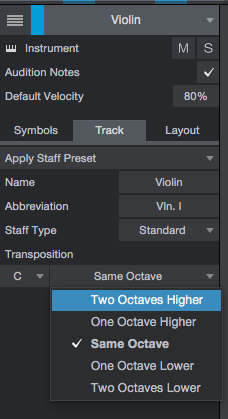
Transposition on the score is also available.

Add Key Signature:
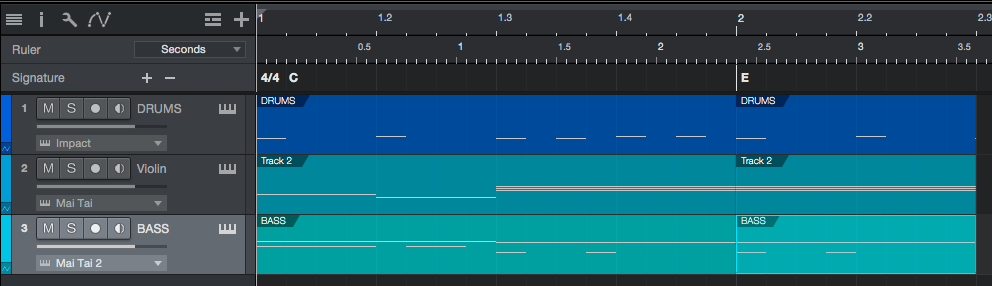
Studio One now includes a Signature Track that lets you add Key Signature changes. These changes will adapt to your score accordingly.

Secondary Timeline Ruler Option:
So now we can have two simultaneous rulers happening! What about a ruler that shows bars and another one for real time? Super useful!
These are just some of the many new features included in Studio One 5.1! Keep tuned for the next part of this series for more of the new functions included on the latest update of PreSonus Studio One.
Using PreSonus Studio One software to produce music would be ideal with one of our professionally designed PCAudioLabs Systems due our high-performance specifications in order to work with any of the Digital Audio Workstations supported. If you would like to order one of our PCAudioLabs computers, please call us at 615-933-6775 or click this link for our website.
Check out the Rok Box PSc PreSonus Certified PCs from PCAudioLabs