
Table of Contents
Summary
In the past, I didn’t use chorus effects much because they never sounded quite right. But then I stumbled on one reason why—and more importantly, how to fix the issue.
Why Your Chorus Effect Doesn’t Sound Quite Right
By Craig Anderton
In the past, I didn’t use chorus effects much because they never sounded quite right. But then I stumbled on one reason why—and more importantly, how to fix the issue and learn why your chorus effect doesn’t sound quite right.
The Problem with Chorus Effects – Why Your Chorus Effect Doesn’t Sound Quite Right
A chorus effect’s intention is to create the sound of two or more instruments playing as an ensemble. Choruses use parallel processing, with a dry path and modulated path. The modulated path has a typical initial delay of 9 to 14 ms. Periodic modulation, from an LFO or envelope, varies the delay time around this fixed initial delay. Mixing the two paths together creates phase and timing interactions between the modulated and dry paths. This produces the chorusing effect.
So far, so good—except that in the real world, when two instrumentalists play together they play to a song’s rhythm. Yet the chorus’s modulated path is always delayed compared to the song’s rhythm, by an amount equal to the chorus effect’s initial delay. Although the delay helps differentiate the two paths, it affects the song’s rhythm negatively because the modulated path always lags the beat. So, the dry path’s “player” follows the beat, but the modulated path’s “player” always plays a little behind.
The Fix – Why Your Chorus Effect Doesn’t Sound Quite Right
The solution to why your chorus effect doesn’t sound quite right is based on going back to chorusing’s origin story—two separate instrumentalists playing together. The only requirement for implementing this fix is that the chorus effect has a wet/dry mix control that can choose a 100% wet signal.
Referring to fig. 1, here’s how chorusing can stay true to a song’s rhythm:
- The original track to be chorused becomes the dry path.
- Duplicate the original track. This will become the modulated path.
- Insert the chorus effect in the duplicated track. Set its wet/dry control to 100% wet.
- Choose the chorus effect’s initial delay time. For this example, assume it’s 12 ms.
- Advance the duplicated track earlier on the timeline by 12 ms, or whatever you choose for the initial delay time amount.
The modulation effect can now move the modulated track slightly ahead of, or behind, the beat—the chorus’s rhythm isn’t always behind the beat by 12 ms. This tightens the timing, and makes a subtle yet noticeable improvement in a song’s feel. What’s more, you can choose long initial delay times without compromising a part’s rhythmic integrity. Granted, this technique requires an extra track—but the improvement is worth it.
The process for advancing the modulation track varies, depending on the program. In Pro Tools, click in the Start field toward the top of the edit window, and type in the new start time. Or if you prefer a dialog box, switch to Spot mode and type in the new start time. Note in fig. 1 how the Guitar Modulated track starts earlier than the Guitar Dry track, and the Chorus Mix control is set to 100%.
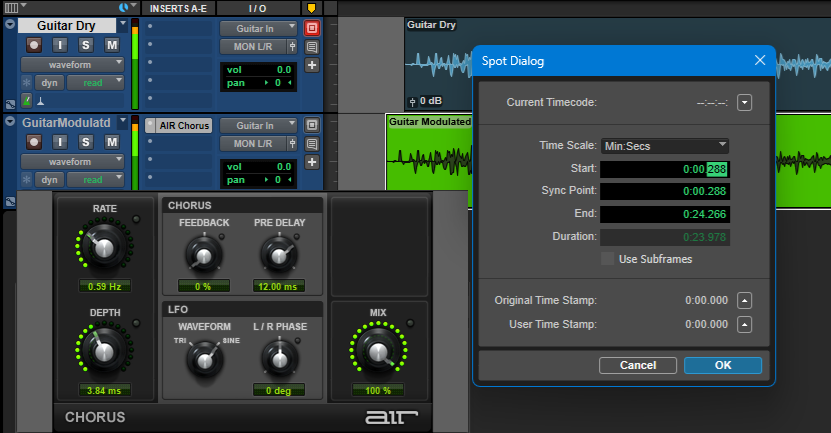
In Steinberg Cubase, set the ruler to Seconds, and enable the Info Line at the top of the project window. Select the clip, double-click the Start field in the Info line, and type the desired start time. In Fender Studio Pro, select Seconds for the Timebase, click on the clip, open the Inspector, and type in the new start time. This will help you troubleshoot why your chorus effect doesn’t sound quite right.
Craig Anderton is a music industry legend—from his teenage touring years, to production and mastering projects for artists from classical to hardcore, to his current work in disrupting the publishing industry. Recent e-books include Innovative Techniques for Pro Tools, The Huge Book of Studio One Tips & Tricks, The Big Book of Cubase Tips & Tricks, The Ultimate Guide to Vocal Production, and How to Record and Mix Great Guitar Tracks. Visit his free educational website at craiganderton.org, and hear Craig’s latest music releases on his YouTube channel.
Need a PC for music production that’s built and supported by music professionals? Check out PCAudioLabs’ line of pro audio PCs.
We hope you found this article about Why your chorus effect doesn’t sound quite right helpful and informative. To learn more, make sure to follow our blog and social media!