
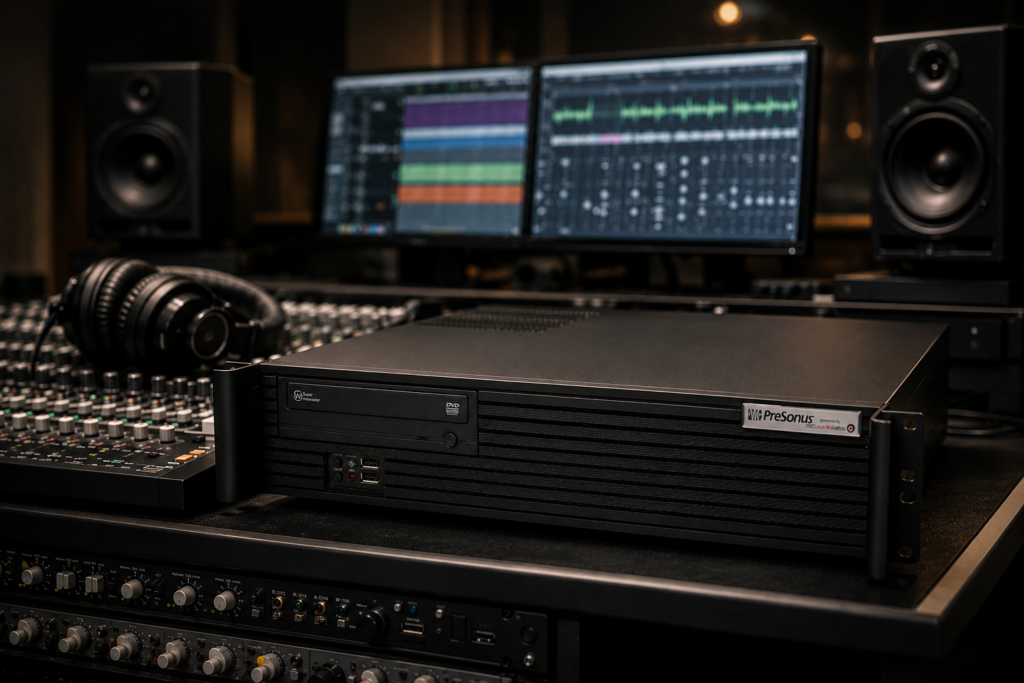
A rackmount computer for audio production solves a very specific problem. You need the power of a serious studio machine, but you also need it to live cleanly in a rack, behave predictably during long sessions, and work around sensitive audio gear without turning your control room into a noise source.
That sounds straightforward until you start comparing systems. A machine that looks strong on paper can still be the wrong fit if it runs too loud, uses poorly matched components, or struggles with low-latency performance once a session gets dense. In audio, the right computer is not just about benchmark numbers. It is about stability under real project loads.
Why a rackmount computer for audio production makes sense
For many studios, rackmount form factor is not just a preference. It is a workflow decision. A rack-based setup keeps the computer in the same environment as interfaces, converters, patchbays, power conditioning, and networked studio hardware. That makes installation cleaner, transport easier, and cable management more predictable.
There is also a practical advantage for production rooms where floor space matters. A rackmount system can live in a machine rack, an isolated closet, a studio desk rack, or a mobile road case. For commercial rooms, broadcast setups, and production rigs that move between locations, that consistency matters.
The trade-off is that rackmount design puts more pressure on thermal planning and acoustic control. In a tower, there is usually more room for large slow-spinning fans and open airflow. In a rack chassis, every component choice matters more. Poor airflow design can mean higher fan speeds, more noise, and heat buildup under sustained CPU loads.
What actually matters in a rackmount audio workstation
The first priority is low-latency stability. Audio production places a different kind of demand on a computer than general office use or even some gaming workloads. Recording through an interface at low buffer settings, running a large plugin chain, or tracking virtual instruments in real time all expose weak points quickly. A system can seem fast until the session requires consistent performance at 64 or 128 samples.
That is why processor choice should be viewed through the lens of DAW behavior, not just core count. Some workloads benefit from more cores, especially in mixing, post production, and larger template-based sessions. Others depend heavily on strong single-core performance and efficient scheduling, particularly when real-time responsiveness matters. It depends on whether your day is built around tracking bands, scoring to picture, editing dialogue, or mixing dense plugin-heavy sessions.
Memory is the next major factor. If your work involves large sample libraries, orchestral templates, sound design sessions, or video alongside audio, RAM is not a place to cut corners. On the other hand, if your projects are centered on multitrack recording and moderate mixing, the right amount of memory may be more modest than spec sheets suggest. The important point is headroom. A production machine should not be living at its memory limit every day.
Storage matters just as much, but in a more targeted way. Fast system drives improve boot and application load times, while dedicated project and sample drives help keep workloads organized and responsive. In audio production, separating operating system tasks from active sessions and library streaming can reduce bottlenecks and simplify maintenance.
Noise, cooling, and the real rackmount challenge
If you are shopping for a rackmount computer for audio production, this is where good systems separate themselves from generic rack PCs.
Rackmount machines are often associated with server noise, and for good reason. Many off-the-shelf rack systems are designed for IT rooms, not control rooms. They prioritize density and cooling over acoustics. That may be acceptable in a data closet. It is a bad fit next to microphones, studio monitors, and open talkback lines.
For audio work, the goal is controlled thermals without harsh acoustic behavior. That requires more than installing quiet fans. The entire chassis, airflow path, power delivery, and component mix need to be considered together. A hot CPU paired with an airflow-restricted case can force fans to ramp aggressively. A poorly chosen GPU can add heat and electrical complexity that an audio-only workflow never needed in the first place.
This is also where form factor matters. A 4U chassis often gives more room for quieter cooling solutions than a thinner rack case. That does not mean every studio needs the largest possible enclosure, but thinner systems typically leave less margin for silence and thermal control. If the machine will sit in the same room as recording talent, those compromises become very real.
Compatibility is not a minor detail
Professional audio users usually do not need a computer that can do everything. They need one that works consistently with specific tools. That means the real question is not whether a system is powerful. It is whether it is stable with your DAW, interface, plugin set, control surfaces, and storage needs.
This is where generic PC buying often goes wrong. On paper, many systems look comparable. In practice, BIOS behavior, chipset selection, USB implementation, graphics choices, and background software can all affect production reliability. Audio dropouts, driver conflicts, DPC latency spikes, and random instability are rarely caused by one dramatic failure. More often, they come from a stack of small decisions that were never made with audio in mind.
A purpose-built system avoids that trial and error. Instead of asking the user to diagnose which motherboard, USB controller, or OS setting is creating friction, the platform is selected and tuned around production use from the start. For serious creators, that saves time where it counts most – during sessions and delivery windows.
Expandability and I/O planning
Studios tend to grow in layers. Today you may need one interface, a few external drives, and a single display setup. Six months later, you may add DSP hardware, more storage, synchronized peripherals, extra displays, or video capture. A rackmount system should be chosen with that growth path in mind.
That means looking carefully at PCIe expansion, USB connectivity, network options, and drive capacity. For some users, Thunderbolt support is essential. For others, stable USB implementation is the priority because of their interface ecosystem. If your workflow includes shared storage, remote collaboration, or large media assets, networking may matter more than you expected.
There is no universal best configuration. A mastering room, a tracking room, and a composer rig will not ask the same things from the same chassis. What matters is whether the system is being specified for your actual workflow rather than a broad consumer profile.
Who should consider a rackmount computer
A rackmount computer is a strong fit for commercial studios, mobile recording setups, broadcast rooms, production spaces built around rack furniture, and creators who want a cleaner integrated installation. It also makes sense for facilities that want the computer secured in a machine room or rack cabinet while keeping peripherals and displays organized in the control space.
It may be less ideal for users who need the absolute easiest access for frequent internal upgrades or who are chasing the quietest possible open-air cooling solution at any cost. In some single-room setups, a well-designed tower can still be the simpler choice. That is not a weakness of rackmount systems. It is just a reminder that physical format should match the room and the workflow.
What to look for from a system builder
When evaluating a rackmount computer for audio production, the system itself is only part of the decision. The support behind it matters just as much. Audio professionals need more than generic hardware fulfillment. They need confidence that the machine was configured with DAW use, driver behavior, thermals, and long-session reliability in mind.
That means looking for a builder that understands buffer settings, interface compatibility, plugin-heavy sessions, and the practical differences between a gaming PC and a production workstation. It also means valuing pre-deployment optimization and testing. A machine should arrive ready to work, not ready to become a weekend troubleshooting project.
This is why many professionals choose a specialist such as PCAudioLabs rather than a mass-market PC vendor. The value is not just in the parts list. It is in the way the system is engineered, validated, and supported for real studio use.
The best rackmount system is the one that disappears into the workflow. It stays quiet, stays stable, and gives you the confidence to press record without wondering what the computer will do next.